
Start using Tautiva
Sign in to Tautiva
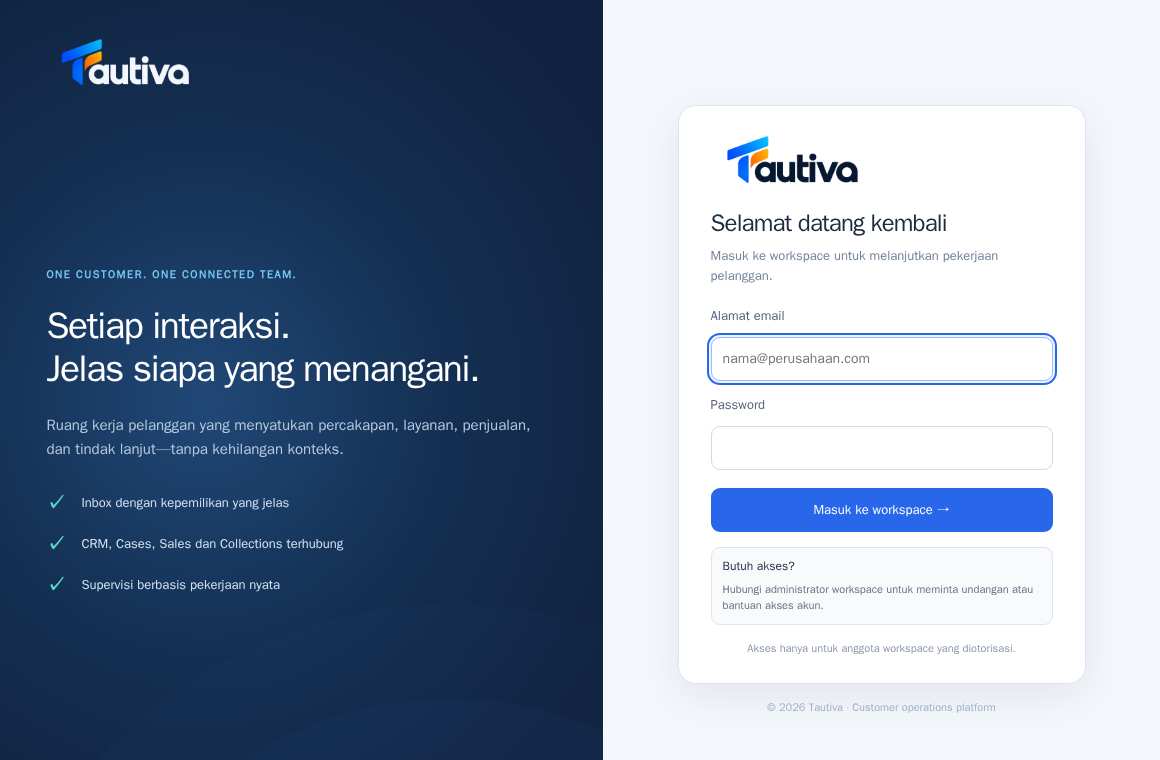
Sign in using the email address and password associated with an account authorized for your workspace.
Before you start
A valid Tautiva account email, active password, and a legitimate workspace invitation or membership.
Step-by-step instructions
Tautiva currently uses a mix of Indonesian and English labels. Follow the button names shown in the application while the dashboard translation is being completed.
Open https://tautiva-app.intrabis.id/login in your browser.
Enter your account email address in the field labeled Alamat email.
Enter your password in the Password field.
Click the button labeled Masuk ke workspace → to sign in.
If successful, the Inbox page or your authorized workspace will open.
PRACTICAL EXAMPLE
Example from daily work
Example: an agent receives an invitation from the company admin, then enters their work email and personal password on the login page.
This is a fictional training example. No real customer data was used.
Expected result
You will log in to your account and see the menu according to your permissions.
Important notes
- Do not share your password or login code with coworkers.
- If you do not have access, request an invitation from the workspace administrator.
If something goes wrong
- If you fail to sign in, check your email address and password. Avoid repeatedly guessing your password.
- If you still fail, contact the workspace administrator—do not create a duplicate account.
This guide describes the interface reviewed on 13 October 2026. Documentation testing did not send real messages, invite users, process payments, or modify real customer records.