
Sales
Monitor the sales pipeline and next actions
Use the sales pipeline to track opportunities and the next action needed for each one.
Before you start
Have already logged in to the workspace and have the appropriate permissions.
Step-by-step instructions
Follow these steps in order. You can keep this guide open while working in another Tautiva tab.
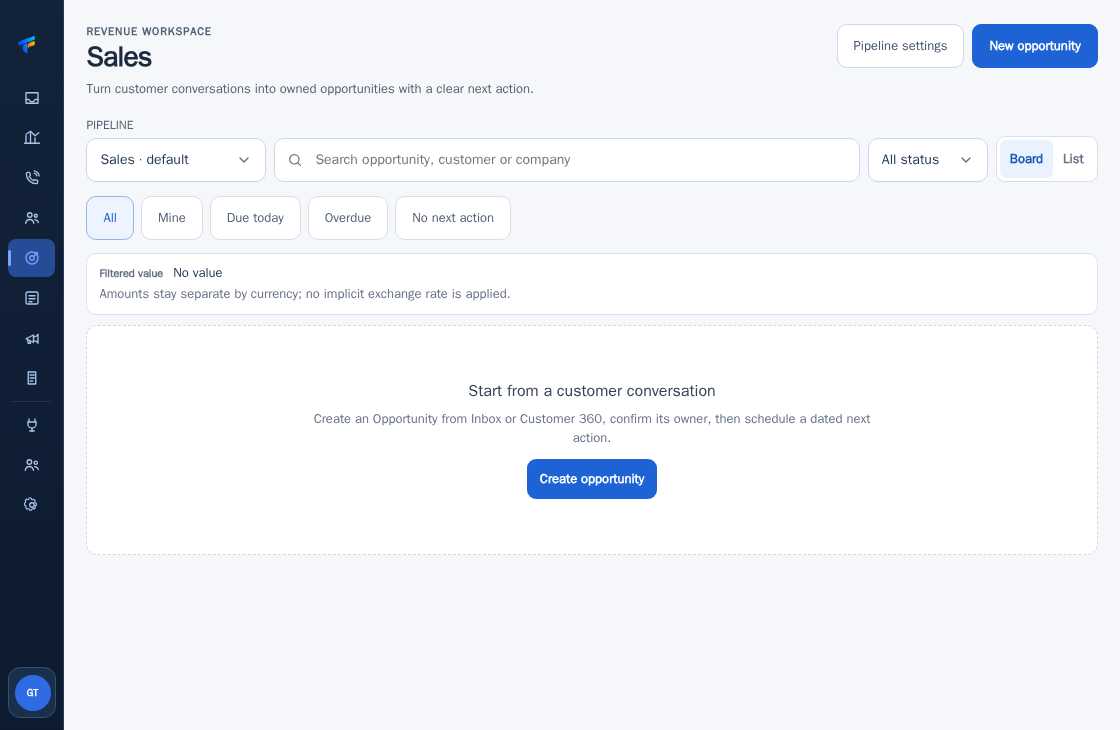
Open Sales and select the Board or List view.
Use All for the entire pipeline, Mine for your responsibilities.
Check Due today, Overdue, and No next action to ensure follow-ups are not missed.
Select the opportunity you want to handle.
Check the person in charge, stage, and next action schedule before updating the data.
PRACTICAL EXAMPLE
Example from daily work
Example: Sales checks Due today to contact prospects that need to be followed up today.
This is a fictional training example. No real customer data was used.
Expected result
Changes or information are visible on the screen according to the actions taken.
Important notes
- If there are no opportunities, the view may display Start from a customer conversation.
- Make sure each opportunity has a person in charge and a next step.
If something goes wrong
- Is the Board empty? Check the pipeline selection, status, and Mine.
This guide describes the interface reviewed on 13 October 2026. Documentation testing did not send real messages, invite users, process payments, or modify real customer records.