
Sales
Understand and configure the sales pipeline
Pipeline settings define the stages of sales work. Changes can affect opportunities across your team.
Before you start
You have Sales configuration permission and the owner's approval of the sales process.
Step-by-step instructions
Follow these steps in order. You can keep this guide open while working in another Tautiva tab.
Open Sales and click on Pipeline settings at the top of the page.
In the Pipelines panel, select the pipeline you want to check, for example, Sales.
Check the Name, Status, and Default pipeline indicator before planning any changes.
Scroll to Stages to view each stage along with Name, Probability %, Order, and Status.
Note: Probability % is only a weight for reporting, not a definite prediction that a transaction will occur.
If the company approves the changes, save using the Save pipeline control or Save at the correct stage according to your access rights.
Reopen the Sales Board or List to check if the stages and status match the company's policies.
PRACTICAL EXAMPLE
Example from daily work
Example: the company has stages such as New, Qualified, Proposal, and Won. The supervisor checks the sequence and Probability % weight without changing the configuration during the audit.
This is a fictional training example. No real customer data was used.
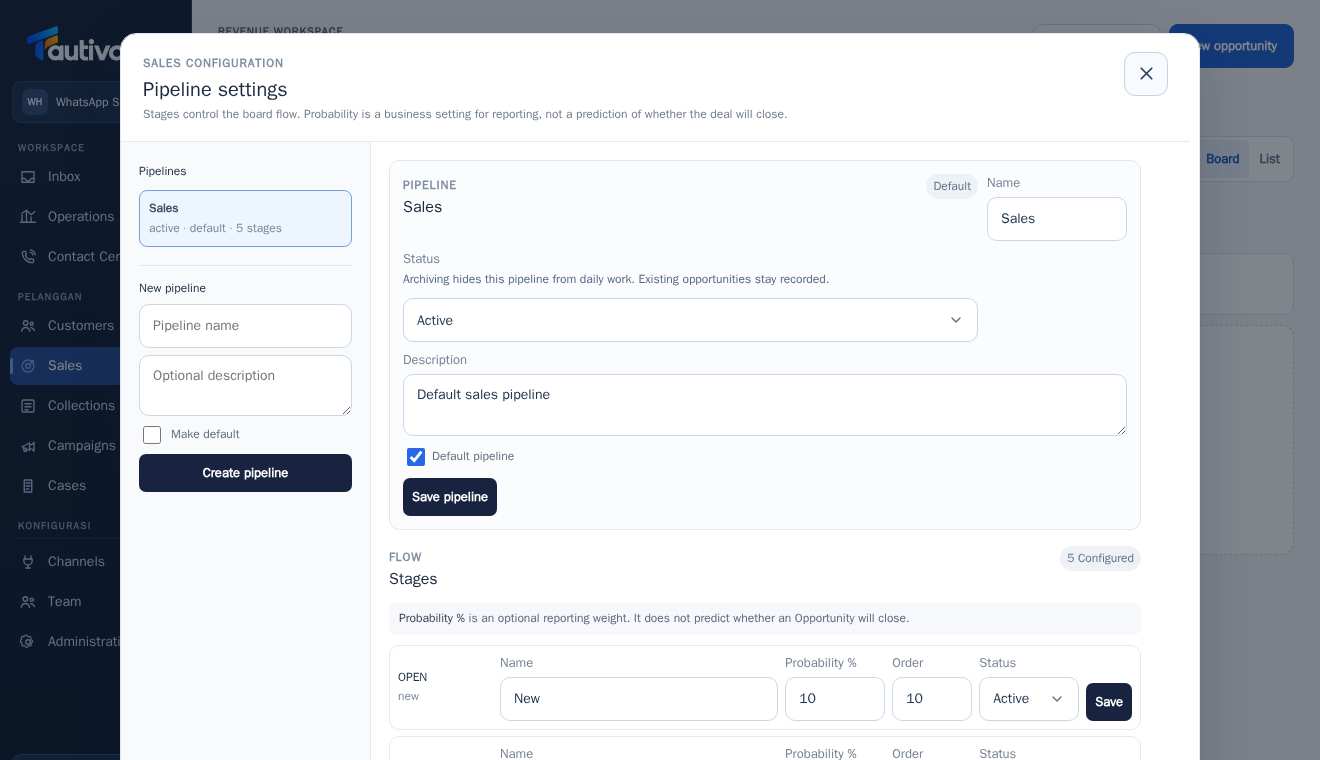
Expected result
The pipeline structure is understood and can be reviewed. No production configurations were changed during the creation of this guide.
Important notes
- Do not create a new pipeline just to try out the button.
- Archiving hides the pipeline from daily work, but old opportunities are still recorded.
- Order sets the display order of stages, not customer priority.
If something goes wrong
- Pipeline settings do not appear: check account permissions and active Sales module.
- Cannot Save: check required columns, duplicate names, and configuration authority.
This guide describes the interface reviewed on 13 October 2026. Documentation testing did not send real messages, invite users, process payments, or modify real customer records.