
Sales
Create a new sales opportunity
An opportunity records a potential sale and its progress for the team.
Before you start
Already logged in to the workspace and have the necessary permissions.
Step-by-step instructions
Follow these steps in order. You can keep this guide open while working in another Tautiva tab.
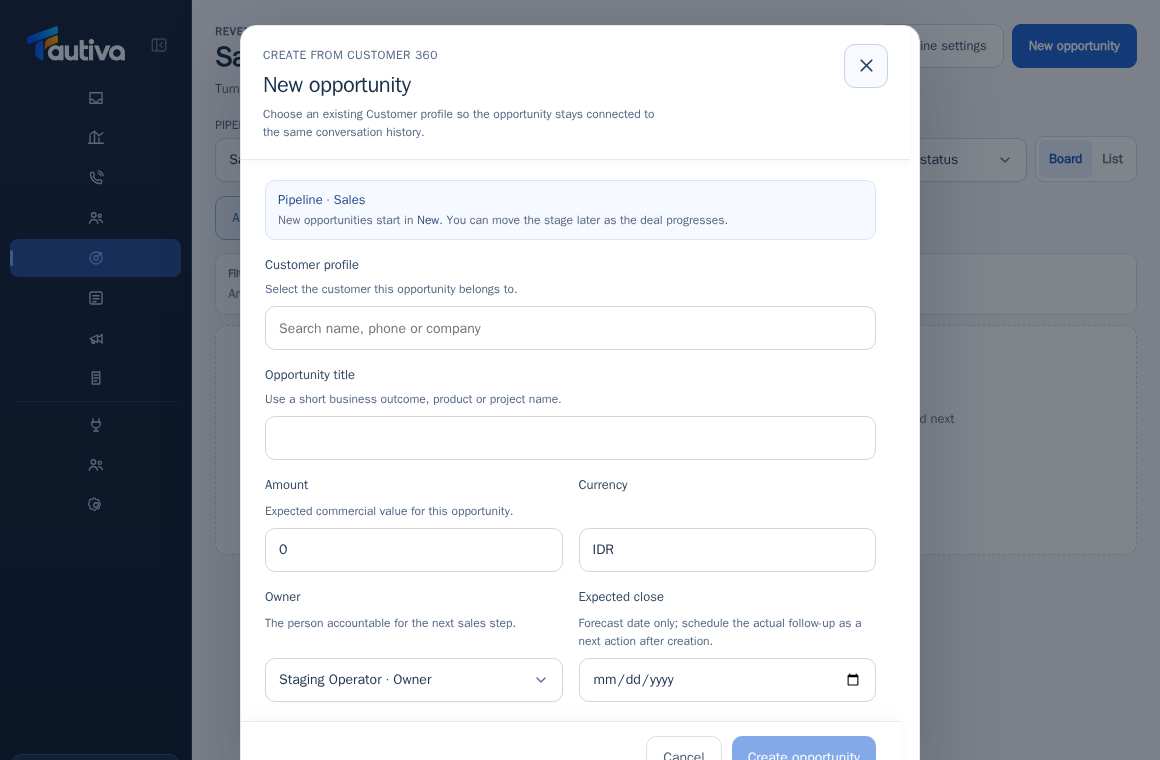
Open the Sales menu and click New opportunity.
In the Customer profile, search for an existing customer and select the correct profile.
Fill in the Opportunity title with the product, project, or customer need.
Fill in the Amount and Currency if the sales value can be estimated.
Determine the Owner responsible for the sales process.
Fill in the Expected close if there is an estimated transaction closing date.
Click Create Opportunity, then schedule a follow-up on the opportunity.
PRACTICAL EXAMPLE
Example from daily work
Example: The company's customer requests a quote for 30 licenses. Opportunity title: 'Quote for 30 company licenses'; value and estimated date according to the proposal.
This is a fictional training example. No real customer data was used.
Expected result
A new Opportunity appears in the Sales pipeline, initially in the New stage.
Important notes
- Expected close is an estimate of the closing date, not a substitute for a scheduled follow-up.
- Different currency values are not automatically converted.
If something goes wrong
- Customer profile not found? Search in Customers before creating a duplicate record.
This guide describes the interface reviewed on 13 October 2026. Documentation testing did not send real messages, invite users, process payments, or modify real customer records.