
Campaigns
Review a Campaign before sending
Review the Campaign message, audience, and delivery settings before approving any send.
Before you start
Permission to manage Campaigns, recipient consent, active WhatsApp channel, and internal approval for delivery.
Step-by-step instructions
Follow these steps in order. You can keep this guide open while working in another Tautiva tab.
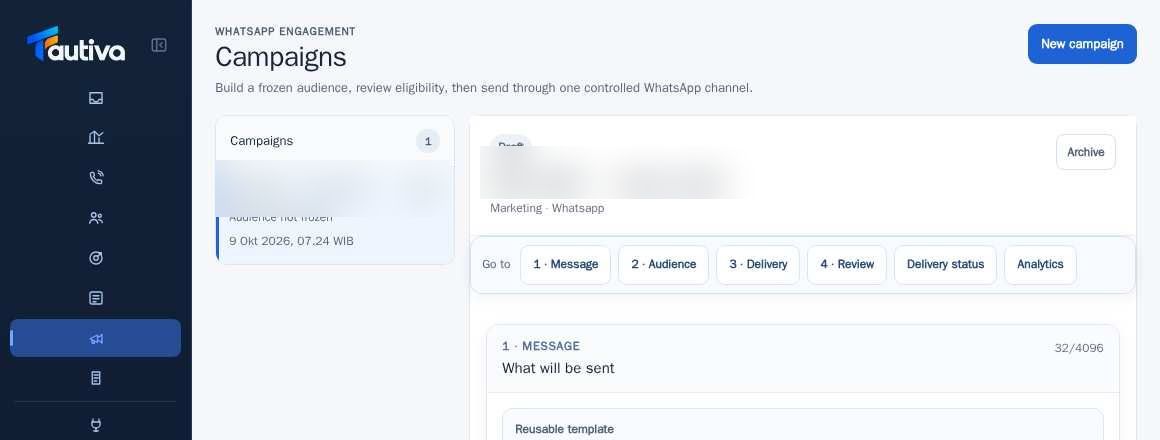
Open the draft in Campaigns.
Review 1 · Message and 2 · Audience, including the result of Freeze audience.
In 3 · Delivery, check the WhatsApp channel and applicable delivery limits.
Enter 4 · Review and check the message, audience, channel, and communication permissions.
Use Mark ready only if all information is correct and approved according to SOP.
Run the delivery only with official authority; monitor Delivery status and Analytics afterwards.
PRACTICAL EXAMPLE
Example from daily work
Example: a supervisor reviews the content, target, and channel connection before allowing the shipping process.
This is a fictional training example. No real customer data was used.
Expected result
Changes or information are visible on the screen according to the actions taken.
Important notes
- This guide is not an instruction to send test messages to real customers.
- The numbers sent, delivered, read, and failed are different statuses.
If something goes wrong
- Mark ready failed? Check personalization, freeze status, channel, and delivery limits.
This guide describes the interface reviewed on 13 October 2026. Documentation testing did not send real messages, invite users, process payments, or modify real customer records.