
Contact Center
Record outbound call interactions
Use Log outbound call to record telephone conversations made by authorized staff.
Before you start
The permission to log calls and the occurrence of calls that have actually taken place.
Step-by-step instructions
Follow these steps in order. You can keep this guide open while working in another Tautiva tab.
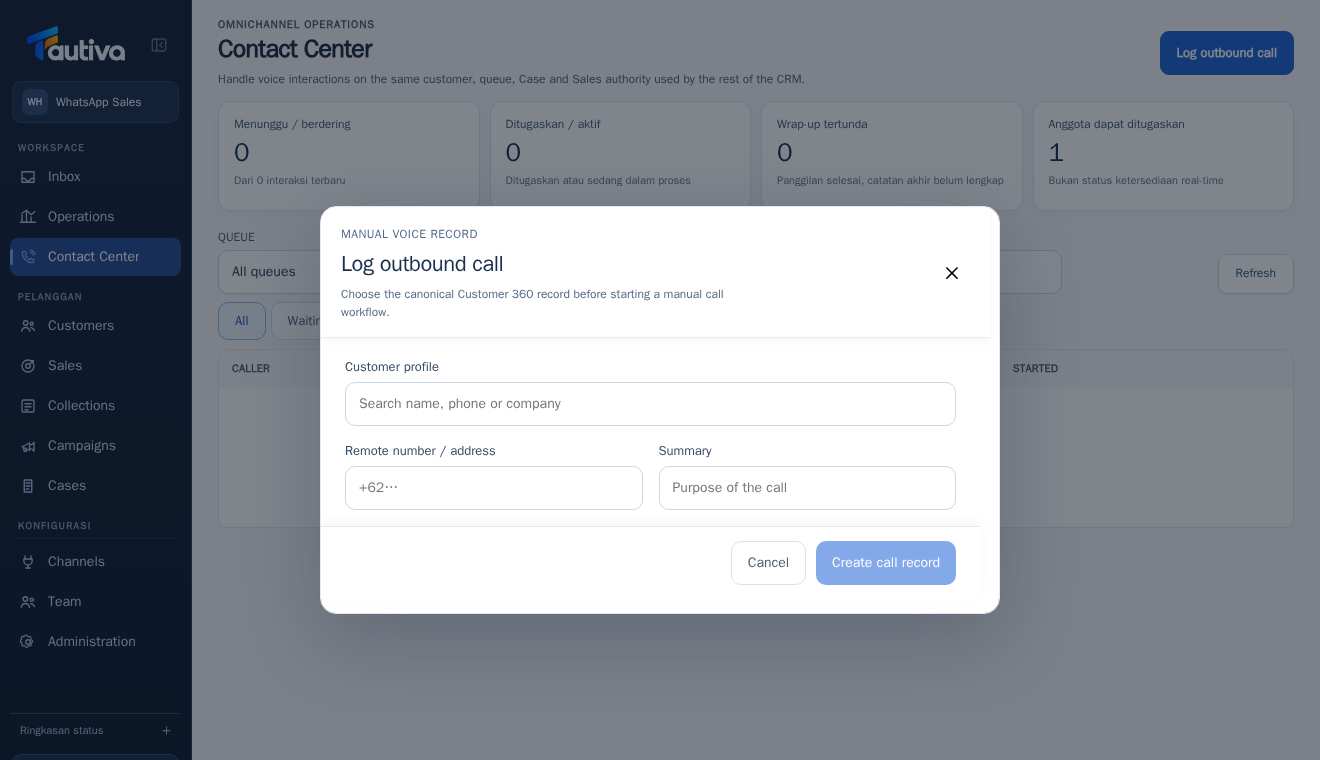
Open Contact Center and then click Log outbound call.
On the Customer profile, find the existing Customer 360 profile and ensure the person is correct.
Fill in the Remote number / address according to the verified contact information.
Fill in the Summary with the actual purpose of the call; avoid unnecessary customer details.
Check the Customer profile, contact number, and summary before clicking Create call record.
Save only if the call was actually made and you have permission; check the result on the interaction list.
PRACTICAL EXAMPLE
Example from daily work
Example: an officer finishes calling a customer who requests a demo schedule. The note includes the result and follow-up schedule.
This is a fictional training example. No real customer data was used.
Expected result
Changes or information are visible on the screen according to the actions taken.
Important notes
- Do not assume this button starts a telephone call through the operator.
- Fill in the notes without revealing unnecessary sensitive information.
If something goes wrong
- No saved log? Check the required columns and permissions, then avoid making a repeat note without a clear status.
This guide describes the interface reviewed on 13 October 2026. Documentation testing did not send real messages, invite users, process payments, or modify real customer records.