
Contact Center
Understand the call lifecycle
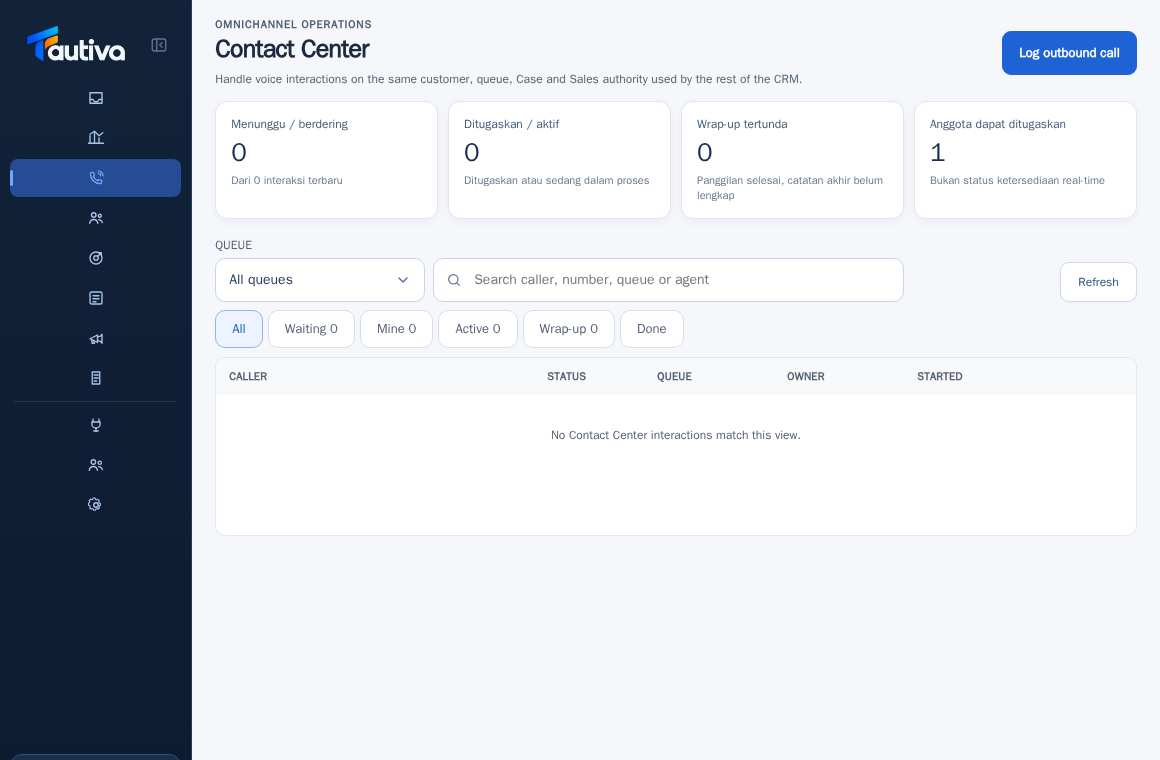
Call statuses show which interactions are waiting, active, or ready for final recording.
Before you start
Access to workspace and correct role.
Step-by-step instructions
Follow these steps in order. You can keep this guide open while working in another Tautiva tab.
Open Contact Center and check Waiting, Assigned, and Delayed Wrap-up cards.
Select the Waiting filter for unhandled interactions.
Use Mine for tasks assigned to you and Active for those being handled.
In Wrap-up, look for calls that are finished but still need result notes.
Use Done for interactions that have been closed.
If there are interactions, click on the row and read customer details, queue, and status before taking action.
PRACTICAL EXAMPLE
Example from daily work
Example: the call has ended but the result has not been filled in; it needs to be completed in the Wrap-up area.
This is a fictional training example. No real customer data was used.
Expected result
You understand the safe steps and results to check without changing data before the procedure is approved.
Important notes
- Calls marked as finished may not have complete wrap-up notes.
- Do not assume this menu is an automatic phone button without a configured provider.
If something goes wrong
- No calls: check range and filter, do not create fictional notes.
- Status not moving: check refresh time and report to supervisor.
This guide describes the interface reviewed on 13 October 2026. Documentation testing did not send real messages, invite users, process payments, or modify real customer records.