
Cases
Configure Case categories, calendars, and SLA targets
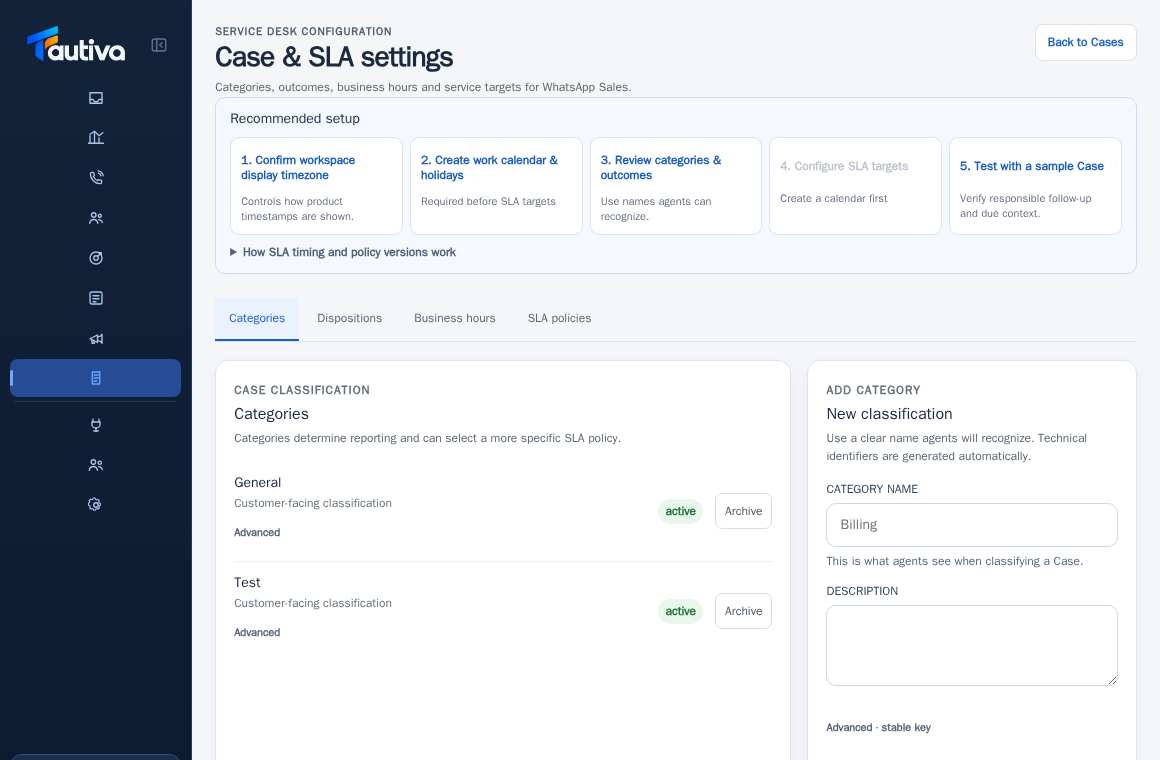
Case & SLA settings define issue categories, working hours, and service targets.
Before you start
Permission to change Case/SLA settings.
Step-by-step instructions
Follow these steps in order. You can keep this guide open while working in another Tautiva tab.
Open Cases and then click Case & SLA settings.
Check the workspace time zone used for time display.
Open Business hours and prepare the work calendar and holidays first.
Use Categories and Dispositions for problem categories and handling results.
Only after the calendar is ready, open SLA policies to review service targets.
Test the rules with an allowed example Case before applying them in operational activities.
PRACTICAL EXAMPLE
Example from daily work
Example: The company operates Monday to Friday. The Admin sets Business hours first before creating the SLA policy.
This is a fictional training example. No real customer data was used.
Expected result
The saved policy becomes a reference for new Cases according to its version rules.
Important notes
- Do not create categories that are difficult for staff to understand.
- Changes to the calendar and SLA affect operational priorities; coordinate with the supervisor.
If something goes wrong
- Cannot create an SLA policy? Make sure the required Business hours calendar is available.
This guide describes the interface reviewed on 13 October 2026. Documentation testing did not send real messages, invite users, process payments, or modify real customer records.