
Collections
Handle disputed customer invoices
A disputed invoice needs clear notes and verification, not repeated collection pressure.
Before you start
Log in to the correct workspace and have the necessary permissions based on your role. Use only valid data and communication.
Step-by-step instructions
Follow these steps in order. You can keep this guide open while working in another Tautiva tab.
Open Collections and search for the relevant customer or obligation.
Check the invoice reference, value, currency, due date, and communication history.
If the customer disputes, document the reason and evidence internally.
Use the available dispute status or control if your role allows it.
Put on hold any collection actions that do not follow SOP until the dispute is reviewed.
Coordinate the review results with Finance and follow up when a decision is made.
PRACTICAL EXAMPLE
Example from daily work
Example: the customer claims to have received a credit note; Collection must check the document with Finance.
This is a fictional training example. No real customer data was used.
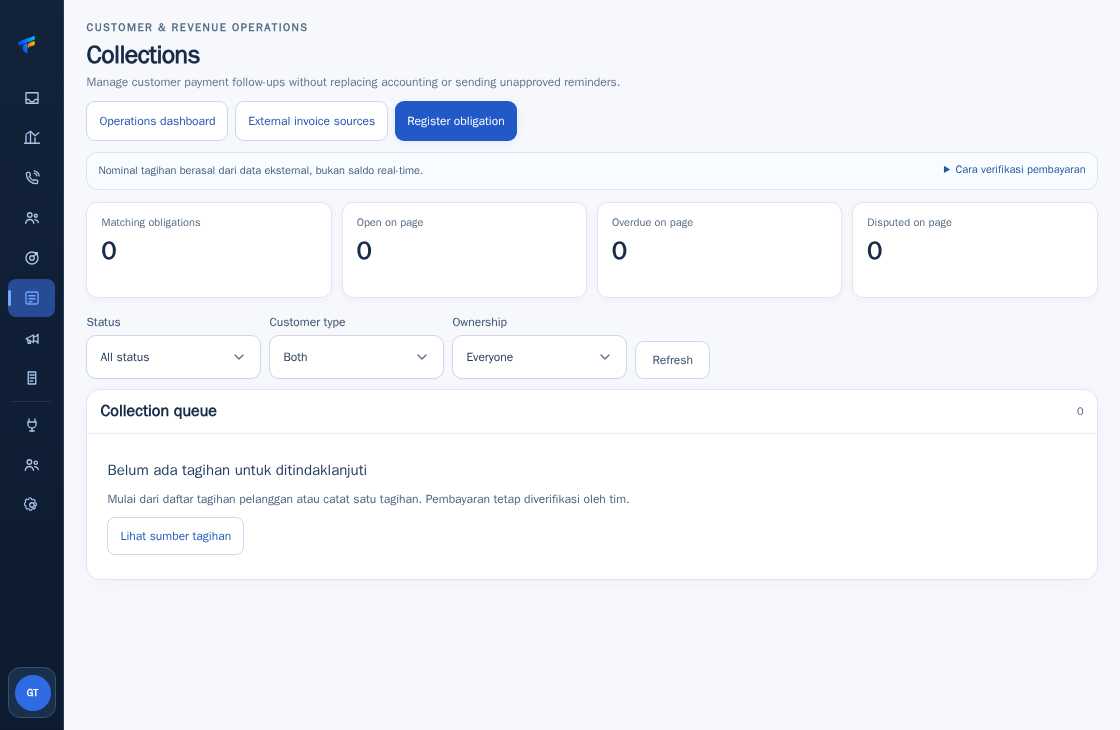
Expected result
Steps and results can be reviewed in the relevant module; send/save actions require SOP and permission.
Important notes
- Do not modify the invoice amount to force a completed status.
- Always separate invoice value disputes from payment claims.
If something goes wrong
- Dispute status is not available: do not replace it with another status arbitrarily; escalate to a supervisor.
- Customer documents differ from the source system: request reconciliation before responding.
This guide describes the interface reviewed on 13 October 2026. Documentation testing did not send real messages, invite users, process payments, or modify real customer records.