
Collections
Record customer payment obligations
Record a payment obligation only when it is backed by a genuine record from an external billing system.
Before you start
Valid billing source, correct customer, and permission to create obligation.
Step-by-step instructions
Follow these steps in order. You can keep this guide open while working in another Tautiva tab.
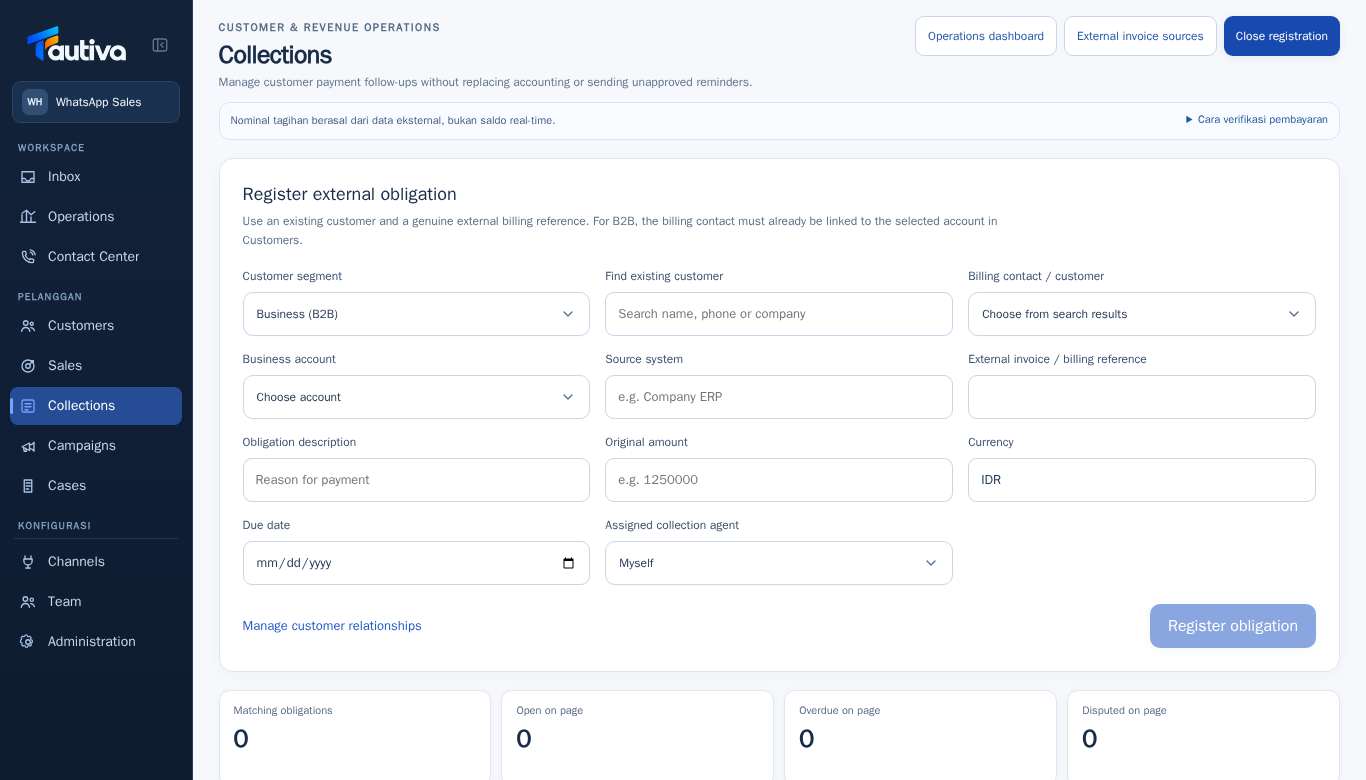
Open Collections, then click Register obligation.
Select Customer segment: Business (B2B) or Individual.
In Find existing customer, search for an existing customer.
For B2B, determine the Billing contact / customer and Business account with the correct relationship.
Fill in Source system and External invoice / billing reference according to the official source.
Fill in Obligation description, Original amount, Currency, and Due date.
Select Assigned collection agent, review the data again, then save via Register obligation.
PRACTICAL EXAMPLE
Example from daily work
Example: Invoice CONTOH-2026-001 for a business customer is recorded with the nominal value according to the original system, not an estimated number.
This is a fictional training example. No real customer data was used.
Expected result
Changes or information are visible on the screen according to the actions taken.
Important notes
- For B2B, the billing contact must be connected to the selected business account.
- Do not create sample bills in the operational workspace.
If something goes wrong
- Reference number rejected? Check for duplication on the source and customer.
This guide describes the interface reviewed on 13 October 2026. Documentation testing did not send real messages, invite users, process payments, or modify real customer records.