
Collections
Check duplicate payment obligations
The same external invoice should not create duplicate payment obligations when the file is imported more than once.
Before you start
Login to the correct workspace and have the necessary permissions according to your role. Use only valid data and communication.
Step-by-step instructions
Follow these steps in order. You can keep this guide open while working in another Tautiva tab.
Open Collections and use the filter to find the intended customer.
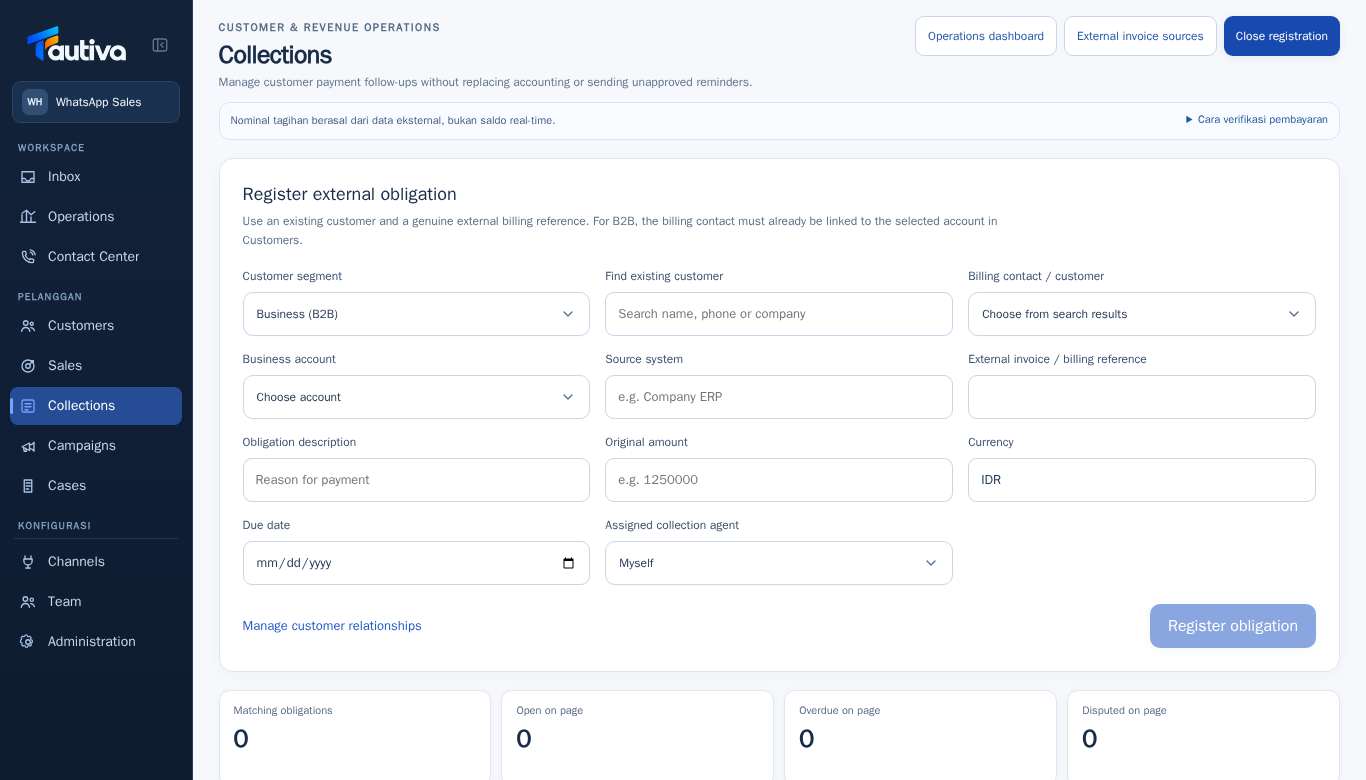
Check the External invoice / billing reference number from the original system.
Ensure the Source system and reference have not been registered for similar obligations.
Compare the Original amount, Currency, and Due date with the source document.
If there are differences, record them as source data issues before creating a new obligation.
If valid and not yet registered, use Register obligation with official data.
PRACTICAL EXAMPLE
Example from daily work
Example: invoice INV-CONTOH-001 already exists; officer reviews old notes, does not enter twice.
This is a fictional training example. No real customer data was used.
Expected result
Steps and results can be reviewed in the relevant module; send/save actions require SOP and permission.
Important notes
- Do not create a second obligation so that missing invoices appear on reports.
- CSV external invoices and obligations are two different types of evidence.
If something goes wrong
- Reference rejected: check if the invoice has been recorded previously.
- Customer cannot be selected for B2B: check the billing contact relationship with the company account.
This guide describes the interface reviewed on 13 October 2026. Documentation testing did not send real messages, invite users, process payments, or modify real customer records.