
Collections
Correct imported invoice CSV files
Follow the invoice source requirements for CSV columns, file size, and corrections.
Before you start
Login to the correct workspace and have the necessary permissions according to your role. Use only valid data and communication.
Step-by-step instructions
Follow these steps in order. You can keep this guide open while working in another Tautiva tab.
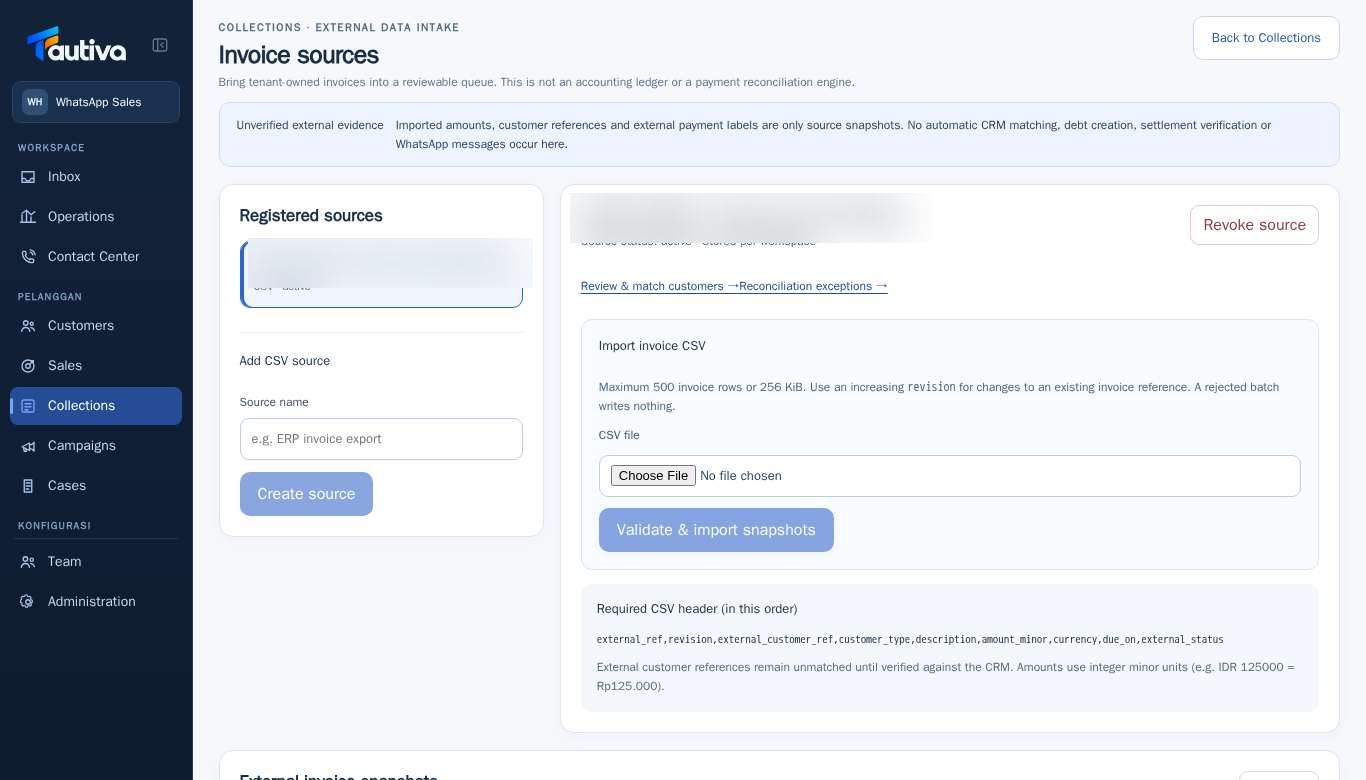
Open Collections > External invoice sources.
Find the Required CSV header section and match the column names and order in your file.
Check if the file contains a maximum of 500 invoice lines and is no larger than 256 KiB as per the audit guidelines.
Ensure the invoice number, date, amount, and revision follow the displayed contract.
Test with Validate & import snapshots after verifying the data.
If the batch fails, read the validation errors, fix the source file, and repeat in a controlled manner.
PRACTICAL EXAMPLE
Example from daily work
Example: CSV containing 540 lines must be separated into valid batches before being sent; do not discard 40 lines without documentation.
This is a fictional training example. No real customer data was used.
Expected result
Steps and results can be reviewed in the relevant module; send/save actions require SOP and permission.
Important notes
- Rejected batches should not save partial data.
- Revisions for the same invoice should be higher than the previous version.
If something goes wrong
- Header mismatch: download or copy the structure called by the Required CSV header screen.
- Revision rejected: check the latest changes to the invoice, not just incrementing the number without explanation.
- Exceeding data limit: split the export into suitable batches and maintain consistent references.
This guide describes the interface reviewed on 13 October 2026. Documentation testing did not send real messages, invite users, process payments, or modify real customer records.