
Collections
Register invoice sources and import CSV files
Invoice sources contain imported copies of external billing records that still need review.
Before you start
A valid CSV file from the company's billing system. File limit when verified: 500 rows or 256 KiB.
Step-by-step instructions
Follow these steps in order. You can keep this guide open while working in another Tautiva tab.
From Collections, click External invoice sources.
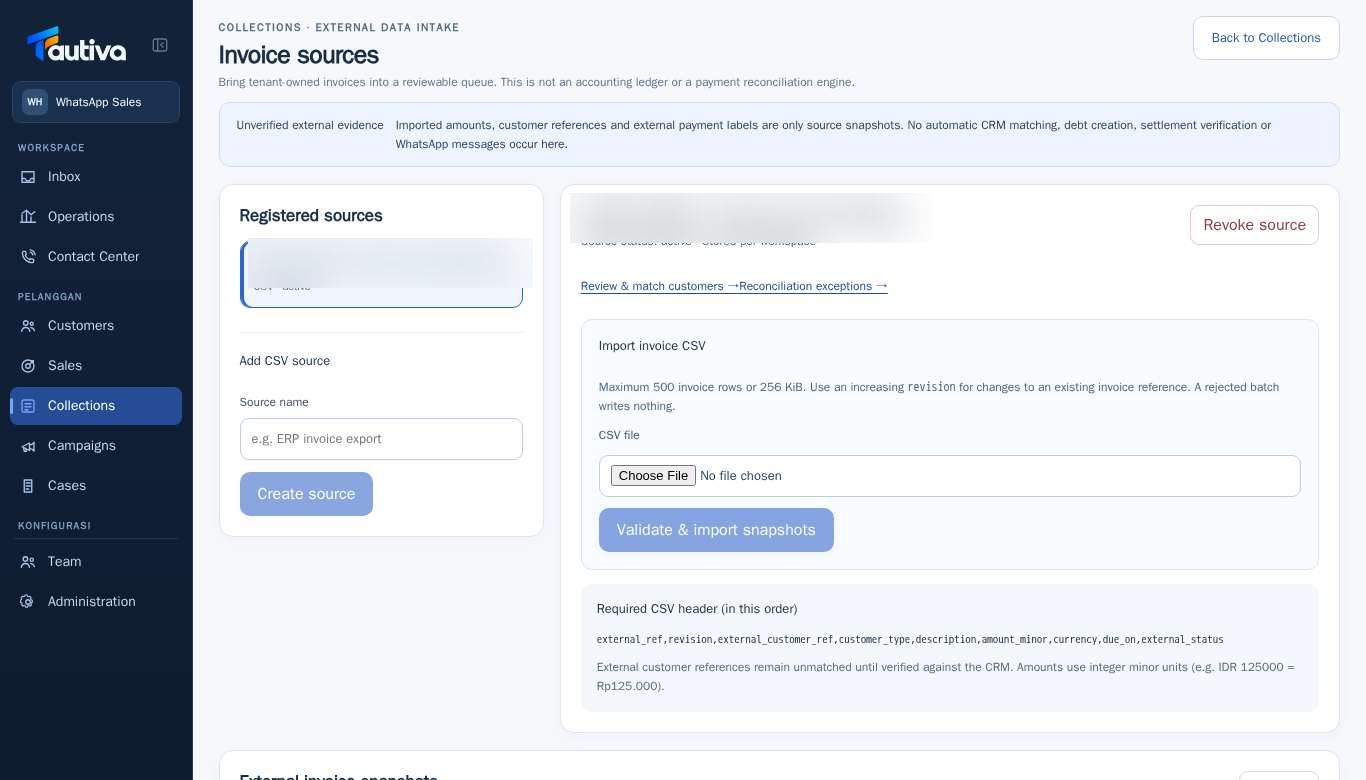
In the Add CSV source section, fill in the Source name and then select Create source.
Choose an active source from Registered sources.
On Import invoice CSV, read the Required CSV header and prepare the file according to the column order.
Select the CSV file and then press Validate & import snapshots.
If successful, check the import results and proceed to Review & match customers or Reconciliation exceptions.
PRACTICAL EXAMPLE
Example from daily work
Example: Finance exports invoices from the company's ERP and validates the header before clicking import.
This is a fictional training example. No real customer data was used.
Expected result
Snapshot invoices are recorded as external data that still needs to be checked.
Important notes
- The same invoice changes require a higher revision.
- If a batch is rejected, the system does not write part of the batch results.
If something goes wrong
- Batch failed? Check the header, revision, row limit, and file size.
This guide describes the interface reviewed on 13 October 2026. Documentation testing did not send real messages, invite users, process payments, or modify real customer records.