
Collections
Verify invoice matching and identity
Names in imported invoices may not match customer profiles exactly. Review matches before sending reminders.
Before you start
The invoice source has been imported and you have review permission.
Step-by-step instructions
Follow these steps in order. You can keep this guide open while working in another Tautiva tab.
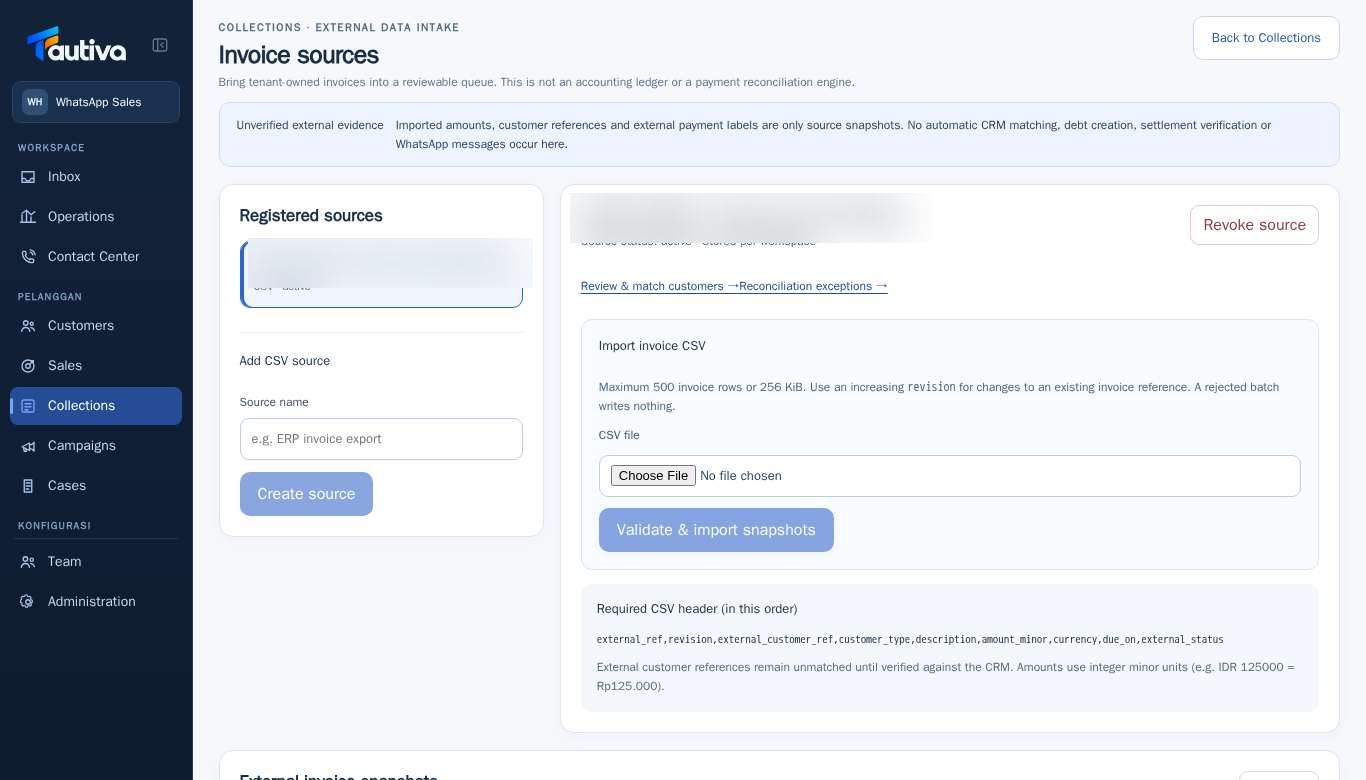
Open Collections > External invoice sources.
Select the invoice source to be reviewed.
Click Review & match customers →.
Compare the identity from the invoice source with the customer in Customers.
Confirm only if the evidence is sufficient; if still unclear, maintain the status as needing review.
After review, return to the source or proceed to Reconciliation exceptions.
PRACTICAL EXAMPLE
Example from daily work
Example: The contact name on the invoice is different by one letter from the CRM profile. The reviewer compares additional identities before determining a match.
This is a fictional training example. No real customer data was used.
Expected result
Changes or information are visible on the screen according to the actions taken.
Important notes
- Do not force a match just because the names are similar.
- The original customer data should be the basis of the decision, not just a guess from the CSV.
If something goes wrong
- No convincing profile match? Leave it unresolved and request verification, do not choose randomly.
This guide describes the interface reviewed on 13 October 2026. Documentation testing did not send real messages, invite users, process payments, or modify real customer records.