
Collections
Understand Collections and invoice data
Collections helps teams track payment obligations and follow-up work.
Before you start
You have logged in to the workspace and have the necessary permissions.
Step-by-step instructions
Follow these steps in order. You can keep this guide open while working in another Tautiva tab.
Open the Collections menu.
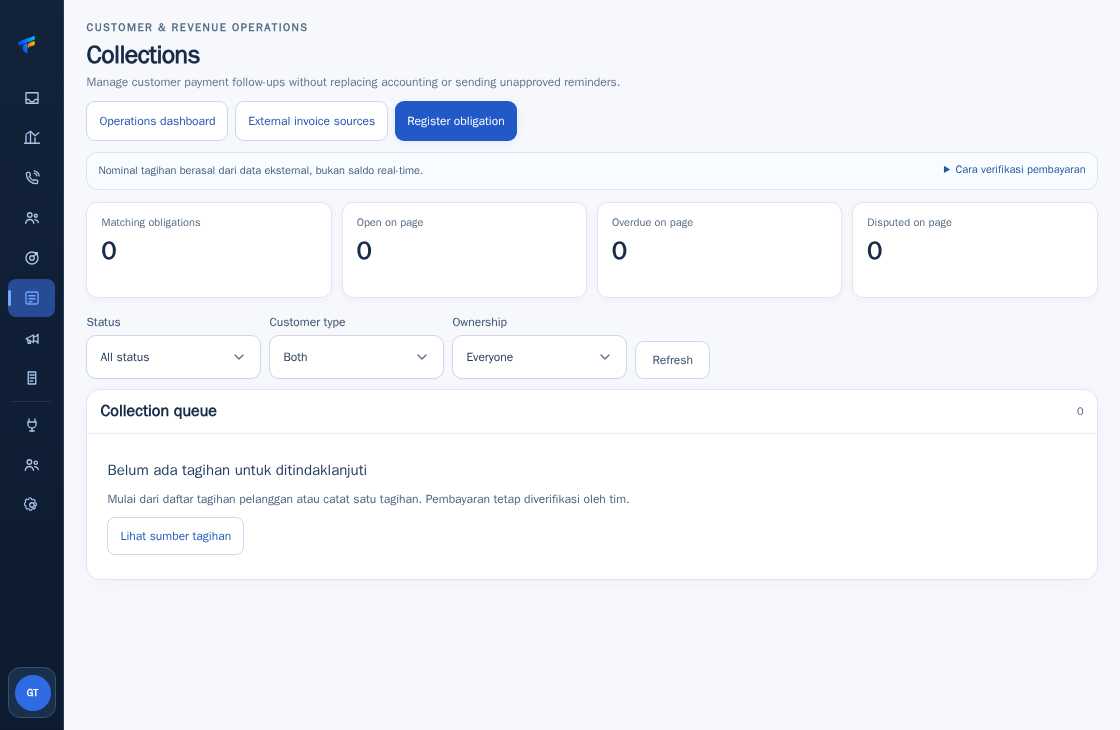
Familiarize yourself with the three sections: Collection queue for recorded obligations, External invoice sources for external CSV, and Operations dashboard for monitoring.
Note that the bill amount comes from external data and not real-time balances.
Use the Status, Customer type, and Ownership filters when searching for tasks.
Before declaring a customer has paid, ensure the payment evidence is verified by a human through the company's procedure.
PRACTICAL EXAMPLE
Example from daily work
Example: A CSV shows 'paid' but Finance has not found the bank transaction. The status still needs to be checked.
This is a fictional training example. No real customer data was used.
Expected result
You can distinguish between the billing queue and unverified CSV invoice data.
Important notes
- Do not assume the paid label on the CSV file means the money has been received.
- Do not send reminders before ensuring authority and customer communication SOP.
If something goes wrong
- No bills in the Collection queue? Check if there is only a CSV snapshot, not a registered obligation.
This guide describes the interface reviewed on 13 October 2026. Documentation testing did not send real messages, invite users, process payments, or modify real customer records.