
Inbox & customer support
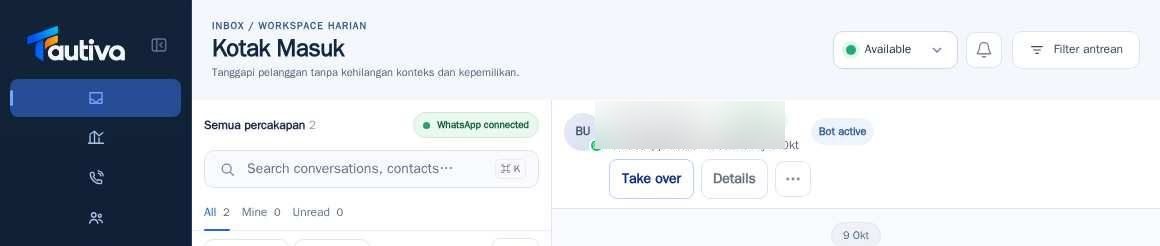
Understand Bot active and Take over
Bot active means the bot is handling the conversation. Authorized staff may take over when needed.
Before you start
You have logged in to the workspace and have the necessary permissions.
Step-by-step instructions
Follow these steps in order. You can keep this guide open while working in another Tautiva tab.
Open the conversation that shows the Bot active status.
Read the chat history to understand the customer's needs.
If the issue requires human intervention, select Take over if available and you have been authorized.
Ensure the conversation handler is correct before responding.
Continue handling and record a Case if necessary.
PRACTICAL EXAMPLE
Example from daily work
Example: a chatbot can't answer a specific refund question; the agent opens the chat and uses Take over after reading the conversation history.
This is a fictional training example. No real customer data was used.
Expected result
Changes or information are displayed on the screen according to the actions taken.
Important notes
- Take over is an operational action; do not press it just to try it out.
- Bot active does not mean the AI is always active. AI configuration is a separate area.
If something goes wrong
- Take over is not available? Check the conversation status and your role; do not send a message when ownership is unclear.
This guide describes the interface reviewed on 13 October 2026. Documentation testing did not send real messages, invite users, process payments, or modify real customer records.