
Inbox & customer support
Open and reply to customer conversations
Reply from the conversation panel only when you have permission to handle that customer.
Before you start
You are an authorized officer and the WhatsApp channel connection is available.
Step-by-step instructions
Follow these steps in order. You can keep this guide open while working in another Tautiva tab.
Open Inbox and click on the customer's name in the queue.
Read the last message and customer identity before typing.
If Bot active is visible and you need to speak directly, check the Take over button and team work rules before taking over.
Click on the Reply column and write a brief and clear answer.
Check the customer's number/name and the answer content, then press Send.
Make sure the reply appears in the conversation history and check the sending status.
PRACTICAL EXAMPLE
Example from daily work
Example of a safe response: 'Good afternoon, thank you for contacting us. Can you explain the issue so we can help you investigate?'
This is a fictional training example. No real customer data was used.
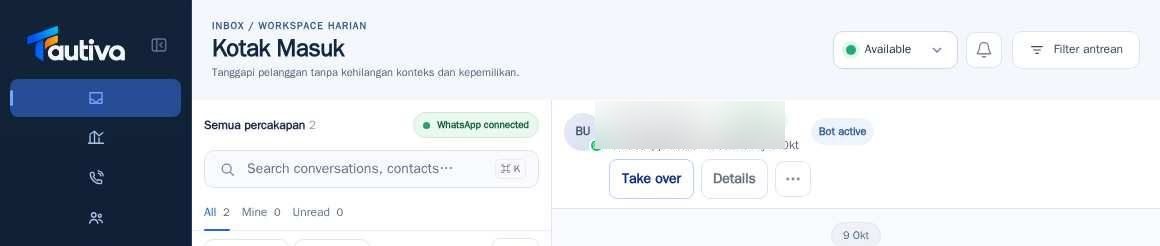
Expected result
The message received by the system appears in the chat history; the sent status depends on the channel/provider.
Important notes
- Enter sends the message; use Shift+Enter to create a new line, according to the application instructions.
- Do not send messages containing other customers' personal data.
If something goes wrong
- If Send is not successful, check the channel status in Channels and try again after the cause is fixed.
- If the bot is still active, do not take over without a service need.
This guide describes the interface reviewed on 13 October 2026. Documentation testing did not send real messages, invite users, process payments, or modify real customer records.