
Team & administration
Manage queue membership and agent capacity
Team Settings controls which agents can accept conversations and how many active conversations they may handle.
Before you start
Already logged in to the workspace and have the necessary permissions.
Step-by-step instructions
Follow these steps in order. You can keep this guide open while working in another Tautiva tab.
Open Team and find the Availability, capacity & routing section.
Select the Workspace routing you want to set up.
Review the Mode, such as Manual, before making any changes.
Fill in Max active / agent if the company applies an active conversation limit. The number 0 means no queue limit.
Review Only route to live Available agents if work rules require it.
Add members to the Eligible team according to tasks and access rights.
Check the Autosave status and confirm that the changes are correct.
PRACTICAL EXAMPLE
Example from daily work
Example: the General queue can only receive Active members for routing and Available when ready to work.
This is a fictional training example. No real customer data was used.
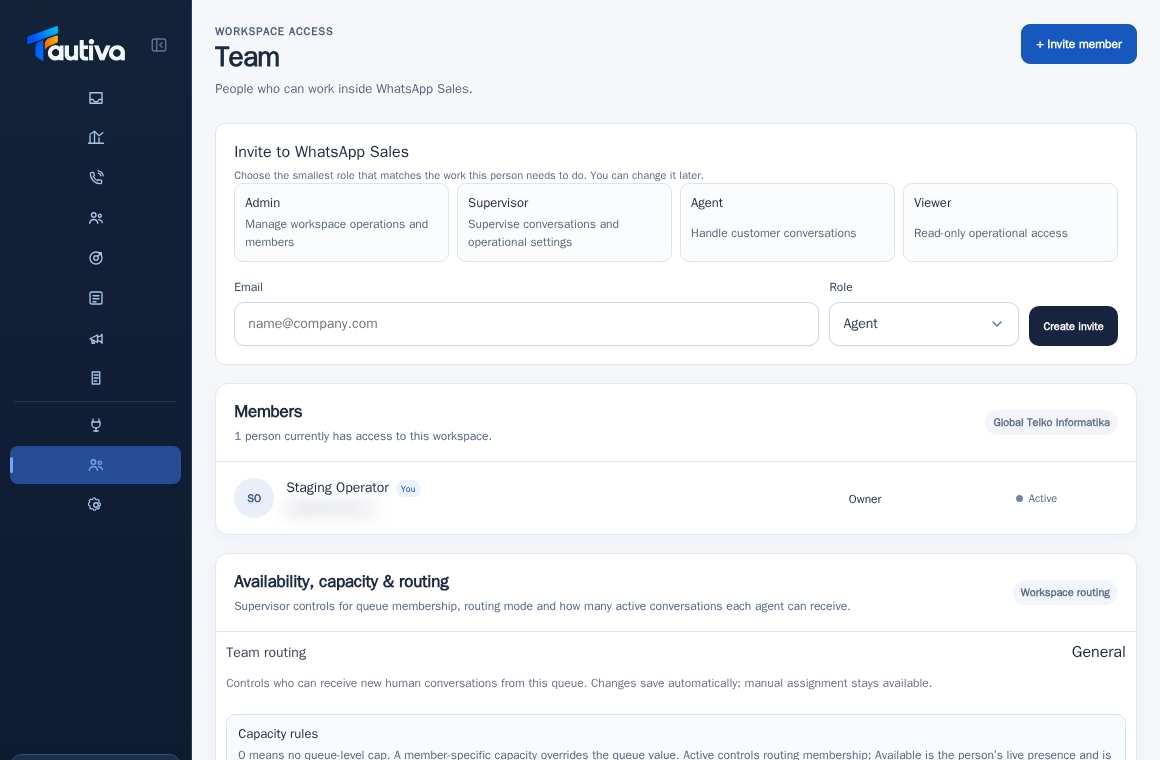
Expected result
Changes or information are displayed on the screen according to the actions taken.
Important notes
- Active status for routing and Available for live presence are two different things.
- Do not change routing rules during busy hours without coordinating with the supervisor.
If something goes wrong
- Agent not entering the queue? Check the Eligible team, capacity, and Active versus Available.
This guide describes the interface reviewed on 13 October 2026. Documentation testing did not send real messages, invite users, process payments, or modify real customer records.