
Team & administration
Understand roles and permissions
Roles and permissions limit access to customer information and the actions each person can perform.
Before you start
Access to the workspace and the correct role.
Step-by-step instructions
Follow these steps in order. You can keep this guide open while working in another Tautiva tab.
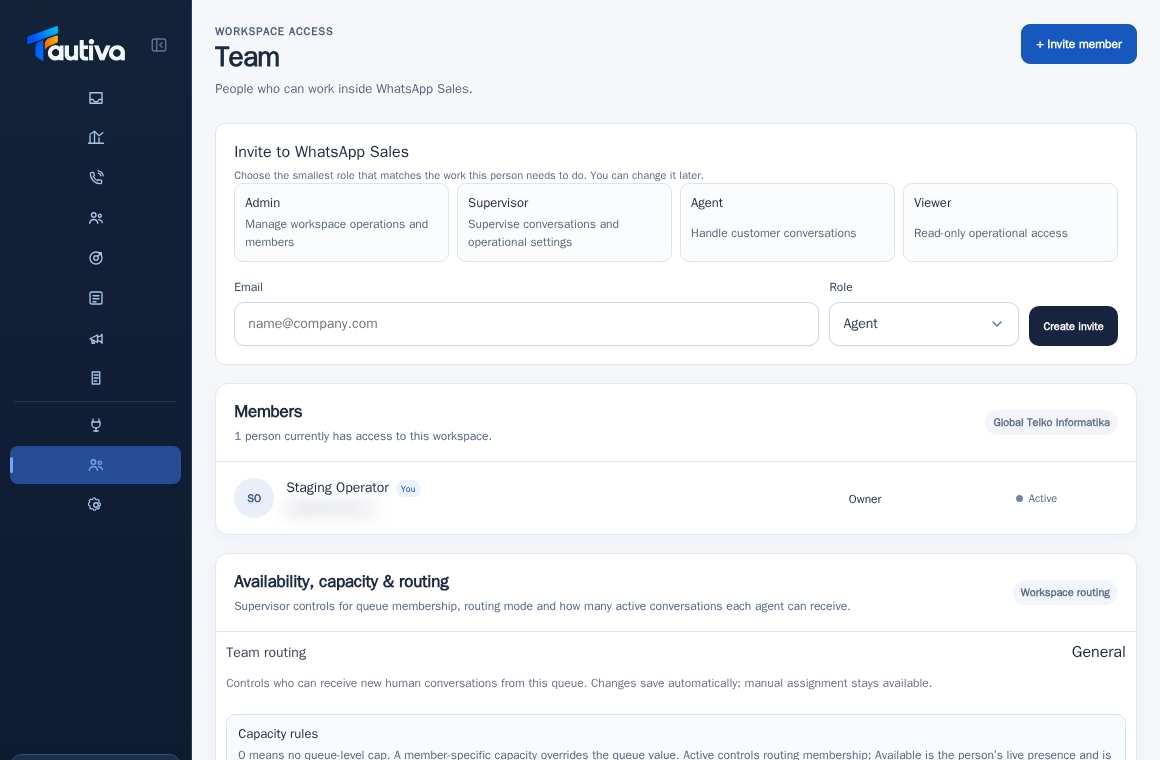
Open Team and click + Invite member just to view the role options without sending an invitation.
Note the Agent, Supervisor, Admin, and Viewer roles.
Choose Agent for staff who need to handle chats.
Choose Supervisor for queue supervision and intervention according to permissions.
Use Admin only for people you trust to manage workspace configurations.
Choose Viewer for people who only need to view certain information.
Before saving the invitation, make sure the workspace and recipient's address are correct.
PRACTICAL EXAMPLE
Example from daily work
Example: a new CS officer is invited as an Agent, not an Admin.
This is a fictional training example. No real customer data was used.
Expected result
You will understand the safe steps and the results that need to be checked, without changing data before the procedure is approved.
Important notes
- Owner is the company/workspace authority that differs from regular additional roles.
- Lack of access is not a reason to borrow a colleague's account.
If something goes wrong
- Recipient cannot open the menu: check the role and package features.
- Role cannot be selected: check that the inviter indeed has administrative permissions.
This guide describes the interface reviewed on 13 October 2026. Documentation testing did not send real messages, invite users, process payments, or modify real customer records.